
Fiverr vs Upwork for beginners the one traditional question every beginner who has decided to start freelancing might ask. That’s why you are here, you have no idea which one to start with.
You have no portfolio. No client reviews. Maybe no clear skill yet. And you need to make money, not spend it figuring things out. Don’t worry
This post is written specifically for you, the complete beginner. Not for experienced freelancers looking to scale. Not for agencies. For the person starting from zero who wants to know: where do I go first to make my first dollar online?
Spoiler: one of these platforms is dramatically more beginner-friendly than the other, and by the end of this post, you’ll know exactly which one to join today.
Check Freelance beginner jobs: the guide to your first gig online
disclosure: This post contains affiliate links. If you sign up through my links, I may earn a small commission at no extra cost to you. I only recommend platforms I genuinely believe in.
Quick Verdict: Fiverr vs Upwork at a Glance
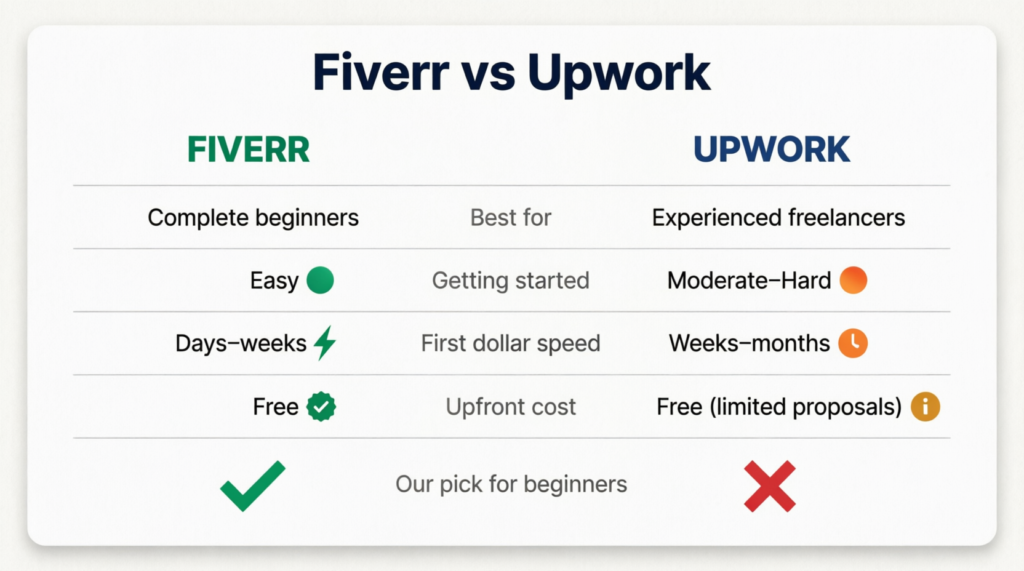
What is Fiverr?
Fiverr is a freelance marketplace where you create a “gig” (basically a listing of a service you offer) and buyers come to you. You set your price, describe what you do, and wait for orders to come in.
That’s the key difference: on Fiverr, buyers find you. You don’t have to pitch anyone or write proposals. You set up your profile once and let the platform do the work of connecting you with clients.
It’s completely free to join and start selling. Fiverr takes a 20% cut from your earnings, but you never pay anything upfront.
👉 Create your free Fiverr account here
What is Upwork?
Upwork is also a freelance marketplace, but it works very differently. Instead of clients coming to you, you go to them. You browse job postings, write proposals, apply, and then wait to hear back.
Upwork is a legitimate platform with serious clients and well-paying contracts. But it’s built for freelancers who already have something to show: a portfolio, past client reviews, proven skills.
There’s also a catch for beginners: Upwork uses a system called “Connects” (credits you spend every time you apply to a job). New accounts get a limited number of free Connects, and after that, you have to buy more. That means you could spend money just applying to jobs, with no guarantee of landing one.
For someone starting with zero experience and a tight budget, that’s a real risk.
Fiverr vs Upwork for beginners: 5 Things That Matter
1. Ease of Getting Started
Fiverr wins.
Setting up a Fiverr account takes under an hour. You create a profile, write a gig title, add a description, set your price, and you’re live. No approval process. No waiting room. You’re immediately searchable by buyers.
Upwork requires a detailed profile, a strong work history section, and crucially, account approval. Upwork has become stricter about who they let in, and new applicants without a clear professional history sometimes get rejected outright.
For a beginner, Fiverr’s barrier to entry is close to zero. Upwork’s is noticeably higher.
2. Do You Need Experience?
Fiverr: No. Upwork: Practically yes.
On Fiverr, complete beginners land their first gigs every day. The trick is starting with a lower price point to attract early orders and build your first few reviews. Once you have 5-10 reviews, you can raise your prices.
On Upwork, clients read your profile carefully before hiring. They look at reviews, work history, and past projects. Without any of those, you’re competing against established freelancers with years of track record, and clients almost always choose experience over a cheaper unknown.
This doesn’t mean Upwork is impossible for beginners. It means it’s the wrong first step.
3. How Fast Can You Make Your First Dollar?
Fiverr: potentially within your first week. Upwork: realistically 4-8 weeks minimum.
On Fiverr, if you set up a well-written gig in a searchable niche and price it competitively, you can get your first order within days. Many beginners report landing their first sale in the first 1-2 weeks.
On Upwork, even if your profile gets approved, you then need to write tailored proposals for each job, wait for responses, go through interviews, and get selected. That process takes time, and most beginners go through weeks of silence before landing anything.
If your goal is to make money fast with no experience, Fiverr is the clear answer.
You may want to check: 9 online jobs that pay weekly in 2026
4. Fees: What Do They Take From You?
Both platforms take 20% from your earnings as a new seller. Be aware of this when setting your prices. If you want to earn $20, charge $25.
On Fiverr, that’s the only cost. You never pay to list a gig or apply for anything.
On Upwork, you also have the Connects system. Every job application costs Connects. New accounts start with a small free allocation, and once those run out, you buy more (roughly $0.15 per Connect, and most jobs cost 6-16 Connects per application). For a beginner sending out lots of proposals with low success rates, this adds up quickly.
Your audience is here to make money, not spend it. That alone tilts the balance firmly toward Fiverr.
5. Risk of Losing Money
Fiverr: zero financial risk. Upwork: real risk for beginners.
On Fiverr, you only work after a buyer has already paid. The money sits in escrow until you deliver. You cannot lose money.
On Upwork, beyond the Connects cost, there’s also the time investment in writing detailed proposals that may never get a response. Time is money, especially when you’re starting out and need early wins to stay motivated.
Who Should Use Fiverr?
Fiverr is the right starting point if you are:
- A student or complete beginner with no portfolio
- Someone who wants to earn money fast without pitching clients
- Offering any digital or creative service: writing, graphic design, video editing, social media, data entry, translation, voice-over, and more
- Working with a tight budget and can’t afford to risk money on proposals
If that sounds like you, start here. It’s free, it’s fast, and you don’t need anyone’s permission to begin.
👉 Create your free Fiverr account and set up your first gig today
Who Should Use Upwork?
Upwork is the right move once you:
- Have at least 6 months of freelancing experience
- Have a portfolio of completed work to show clients
- Have testimonials or reviews from past clients (even from Fiverr)
- Are looking for long-term contracts rather than one-off gigs
Upwork has higher average contract values than Fiverr, and its clients tend to be more serious businesses. But you need credibility to access that. Fiverr is how you build that credibility first.
We’ll cover exactly how to succeed on Upwork in a future post, but if you’re just starting out, it’s not your first stop.
Common Beginner Mistakes to Avoid on Both Platforms
Whether you start on Fiverr or eventually move to Upwork, avoid these early mistakes:
- Pricing too high before your first review. Start lower to land those first few orders, then raise your rate.
- Writing a vague gig title. “I will help you with stuff” won’t rank. Be specific: “I will write SEO blog posts for your small business.”
- Skipping the profile photo. Profiles without a clear photo get far fewer clicks. Use a real, friendly photo.
- Ignoring your gig description. Your description is your sales page. Explain clearly what you offer, what the buyer gets, and why you’re the right choice.
- On Upwork: sending generic proposals. If you eventually move to Upwork, every proposal needs to be tailored to that specific job. Copy-paste proposals get ignored instantly.
Find list of top side hustles mistakes to avoid
So, Fiverr or Upwork for Beginners?
The answer is clear: start with Fiverr.
It’s free to join, requires no experience, gets you earning faster, and carries zero financial risk. It’s designed for exactly the situation you’re in right now, starting from zero and wanting to turn a skill into income.
Upwork is a great platform. It’s just not your first step. Build your reputation on Fiverr first. Get your first 5-10 reviews, develop your process, and learn what clients actually want. Then, when you’re ready, Upwork will be a much easier platform to break into.
But that’s a problem for later. Right now, your job is to get started.
👉 Start your free Fiverr account here, no experience needed
FAQs: Fiverr vs Upwork for beginners
Which is better for beginners, Upwork or Fiverr?
Fiverr is significantly better for beginners. It requires no experience, no upfront cost, and lets you start earning within days of setting up your profile. Upwork is better suited for freelancers who already have experience and a portfolio to show.
Can you make $10k a month on Upwork?
Yes, but it’s not typical for beginners. $10k/month on Upwork usually requires strong skills (design, dev, marketing, copywriting), a solid profile, consistent client acquisition, and repeat/high-ticket clients. Most freelancers take months or years to reach that level.
What pays more, Upwork or Fiverr?
None of these 2 platforms inherently pays more, it depends on how you use them.
- Upwork: better for high-value, long-term contracts and hourly work
- Fiverr: better for productized services and scalable offers
Top earners exist on both, but Upwork tends to lean toward higher-ticket clients.
Which freelancing is best for beginners?
For most beginners, Fiverr is the easiest entry point to get first clients and experience. Upwork becomes more powerful once you already have skills, reviews, or a portfolio to compete with stronger freelancers.
Found this helpful? Share it with a friend who’s thinking about starting freelancing. It might save them weeks of confusion.